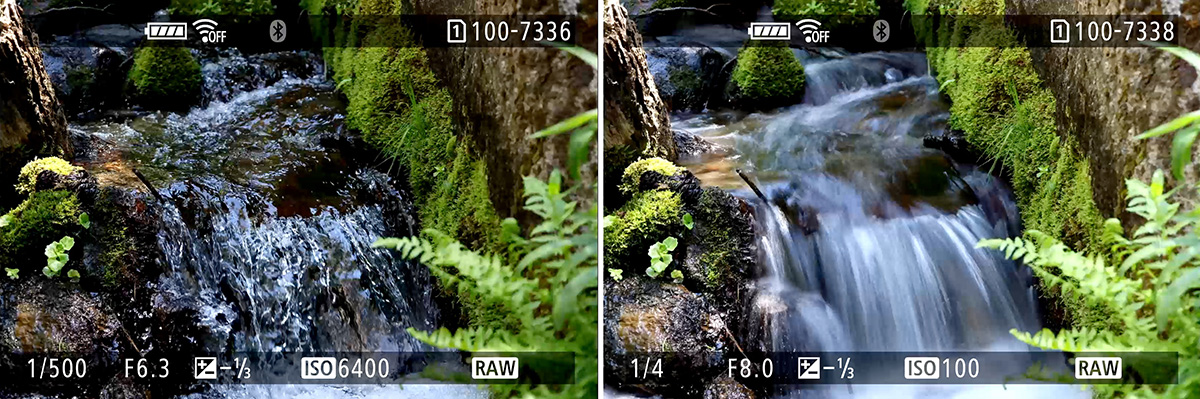
This free course walks through the exposure triangle step by step, using clear examples and simple exercises to help you understand what your camera is doing and why.
What's included in the course
10 Video Lessons

Short, focused video lessons with text outlines.

5 Quizzes

Quick quizzes to reinforce understanding.

4 Exercises

Simple exercises to apply what you learn.

Also included: Exposure Simulator

Adjust aperture, shutter speed, and ISO and see the combined effects on exposure, depth of field, and motion in real time. Works in the course player and on the mobile app.
exposure simulator

You'll learn how to

  • Take control of exposure instead of guessing
  • Use aperture and shutter speed creatively, on purpose
  • Balance exposure confidently using stops of light
  • Move beyond AUTO mode with a clear understanding of what changes when you adjust settings

"This course makes you think and teaches you about the exposure triangle fundamentally."

Leslie Hankey

Course overview

  • Understanding the camera basics (4 videos, 16 min)
  • Understanding stops of light (2 videos, 9 min)
  • How aperture, shutter speed, and ISO work together (2 videos, 15 min)
  • Putting the exposure triangle into practice (2 videos, 8 min)
MEET YOUR TEACHER

John Peltier

I've worked as a documentary photographer since 2012, with projects in Haiti, Guatemala, Uganda, and more, and publications including New York Magazine, the Los Angeles Times, and the U.S. National Park Service.

Since 2017, I've brought that rigorous field experience to teaching, primarily to beginners working through the same struggles you're probably facing right now. These courses are built around a proven method to simplify the way you learn photography.

A clearer way to understand exposure

If AUTO mode feels limiting, this course will help you understand what your camera is doing and why, without formulas or jargon.